

A tiny weekly page can hold much more than appointments. Use the seven rows for daily anchors, a meal plan, a content schedule, household responsibilities, wellness intentions or one-line memories. The layout gives each day a place; you decide what kind of week the sheet represents.
6 ways to use a tiny weekly planner
| Use | One-line example |
|---|---|
| Weekly overview | Mon: dentist 3:00 |
| Meal plan | Tue: tacos + salad |
| Content plan | Wed: film desk-reset reel |
| Home schedule | Thu: laundry + water plants |
| Wellness intentions | Fri: evening walk |
| Memory keeping or journal deco | Sat: farmers market ☀ |
From the designer: a little weekly planning inspiration
A small sheet, a few marks, and a place in your planner. Here is a real-life idea from JOYJOY for making the weekly layout your own.
How to use the seven-day layout
This pad prints Sunday through Saturday, but it does not require your workweek to begin on Sunday. Sunday can be a reset, meal-prep, family or reflection row, while Monday still functions as the beginning of your work or school week. If you prefer to see the weekend grouped at the end, a Monday-start layout may suit you better.
| Choose Sunday start if… | Choose Monday start if… |
|---|---|
| You reset or meal-prep on Sunday | You plan mainly around workdays |
| Your household calendar begins Sunday | You want Saturday and Sunday together |
| Your shifts or school week cross the weekend | Your existing calendar uses ISO-style weeks |
The seven-anchor weekly method
- Scan your calendar for fixed commitments.
- Write one anchor beside each day.
- Leave genuinely open days blank.
- Add a symbol for anything time-sensitive.
- Review the next two days each evening.
An anchor can be “dentist 3:00,” “submit draft,” “laundry” or “rest.” It is not a complete to-do list. Limiting the overview keeps it readable and prevents a two-inch page from pretending to hold an entire schedule.
What belongs somewhere else?
Put multi-step projects, detailed errands and hour-by-hour schedules in a larger planner or task list. The tiny weekly view should answer, “What is the shape of this week?” If a day needs detail, use the anchor as a pointer to the fuller page.
Try a tiny weekly overview
The JOYJOY Weekly Planner Mini Notepad has seven Sunday-through-Saturday rows on every sheet. The 50 × 50 mm pad includes 50 non-adhesive tear-off sheets for short weekly anchors. Compare all functional designs in the Memo Pads collection.
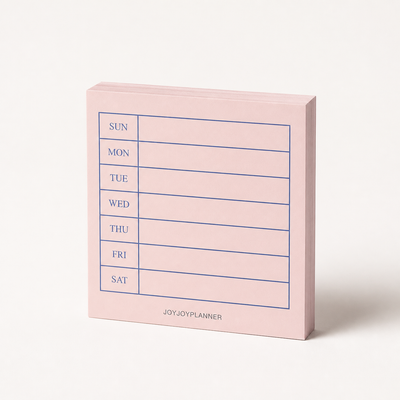
Weekly Planner Mini Notepad
Sunday-start seven-day layout · 50 × 50 mm · 50 tear-off sheets · non-adhesive
$5.99 · Currently unavailable
View ProductNeed more room? Learn how to choose planner inserts, or use the layered approach in the ring planner system guide.
Weekly planning FAQ
Can I use a Sunday-start planner if my workweek starts Monday?
Yes. Use Sunday as a reset row, then plan Monday through Friday normally.
What if I have more than one priority per day?
Write the most time-sensitive anchor on the mini overview and keep the full list in your planner or task manager.
Should I fill all seven rows?
No. Blank space accurately shows that a day has no essential anchor yet.